Artflow has changed from a simple "digital actor" generator into a personal AI identity and content platform. The current product focuses on creating a persistent Actor from your face, then using that identity across images, videos, templates, branded visuals, posters, social content, and editing tools.
Artflow Review: Great for AI Actors and Creator Identity, Limited for Full Films
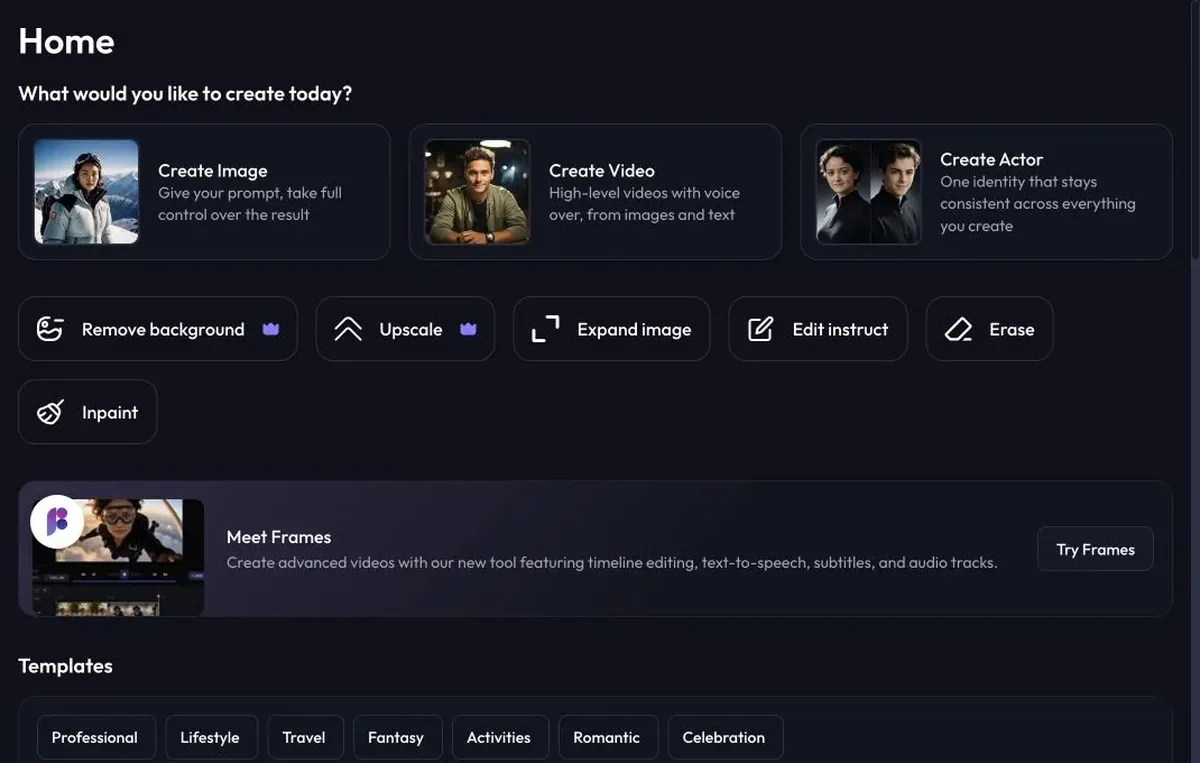
The first screen is practical and easy to understand. Artflow puts Create Image, Create Video, Create Actor, background removal, upscaling, image expansion, edit instruct, erase, inpaint, Frames, and templates in one dashboard. I like that because the product does not hide its main workflows behind a cinematic landing page. You can immediately see that Artflow is about making reusable identity-based visuals.
The product is now clearly optimized for personal branding and creator content. The positioning is "You. Reimagined." and repeatedly frames Artflow around using your own face consistently across professional photos, social posts, videos, posters, and branded visuals.
Artflow Features: Persistent Actors, Templates, Editing, and Frames
Artflow's core concept is the Actor: a persistent AI identity trained from 10-20 clear photos of your face. That is the main reason I would use Artflow over a generic image generator. If your content needs the same person to appear across portraits, social posts, thumbnails, posters, and simple videos, the Actor workflow is much clearer than rebuilding a character prompt every time.
The dashboard separates image generation and video generation, which keeps the app approachable. The video side is framed around voiceover, images, text, social formats, and consistent identity, so it feels more creator-led than film-production-led. That is not a bad thing; it just means Artflow is better for personal-brand clips, presenter assets, and visual content than for managing a narrative film.
Frames is the most film-adjacent piece of Artflow. It is described as an advanced video tool with timeline editing, text-to-speech, subtitles, and audio tracks. I would still think of it as a lightweight creator video workflow rather than a full filmmaking timeline, but it gives Artflow more depth than a simple headshot generator.
The editing tools are practical. Background removal, upscaling, image expansion, edit instruct, erase, and inpaint cover the cleanup steps you usually need after generation. The template library also matters because Artflow's best use cases are not just raw images; they are profile photos, professional portraits, lifestyle content, travel-style shots, fantasy portraits, seasonal cards, branded posters, and social assets.
Artflow Pricing: Affordable Entry, Credit and Actor Planning Required
Artflow is inexpensive to start, but it is still a credit-and-Actor product, so you should check how many identities and generations you need before choosing a plan. Annual pricing lists Basic at $6.25/month billed $75 annually, Creator at $12.50/month billed $150 annually, Pro at $29.17/month billed $350 annually, and Ultra at $82.50/month billed $990 annually. Monthly billing is listed at $7.50, $15, $35, and $99/month.
The plan differences are mostly about monthly credits, extra-credit discounts, premium features, and Actor costs. Basic includes 150 credits/month, Creator includes 500, Pro includes 1,500, and Ultra includes 5,000. Actor pricing varies by plan and pack size, from $5.99 per Actor on small Basic packs down to $2.50 per Actor on Ultra 10-packs. For a solo creator testing one identity, the lower plans are enough to understand the product. For repeat campaigns with multiple identities, Actor pricing becomes part of the real cost.
Artflow: What I Like and What Could Be Better
What I like most is that Artflow makes the identity-consistency problem easy to understand. The Actor workflow gives creators a clear path for building a reusable AI version of themselves, and the surrounding tools cover the obvious next steps: images, videos, background removal, upscaling, expansion, erase, inpaint, templates, and Frames.
The product feels strongest for personal branding, profile photos, social posts, and creator visuals. For filmmaking, I would treat it as a character or persona asset tool rather than the place where the whole film lives. It can help create consistent visuals, but it does not replace a workspace for scenes, storyboards, voices, music, sound effects, and video production planning.
Artflow Alternative: Why Melies Can Be a Better Fit
Artflow is strongest when you want a consistent AI version of yourself for portraits, videos, social content, branded visuals, and templates. It is a personal-brand content platform.
Melies is stronger for AI filmmaking. It gives you a project workspace for story, scenes, AI actors, storyboards, posters, prompts, voices, music, sound effects, and production assets. If you are searching for an Artflow alternative because you want to create an AI film, Melies is the better fit.
Artflow helps you generate content starring a consistent person. Melies helps you build the whole film around characters, scenes, and production assets.
Artflow FAQ: Pricing, Features, and Alternatives
What is Artflow?
Artflow is an AI visual content platform for creating persistent AI Actors, images, videos, personal-brand templates, and editing outputs.
What is an Artflow Actor?
An Actor is a persistent AI identity trained from your photos. Artflow says users should upload 10-20 clear photos, and training takes about 10-30 minutes.
Is Artflow free?
Artflow promotes a free trial and no credit card required. Paid plans start at $6.25/month billed annually.
How much does Artflow cost?
Annual pricing lists Basic at $6.25/month, Creator at $12.50/month, Pro at $29.17/month, and Ultra at $82.50/month. Monthly prices are $7.50, $15, $35, and $99/month.
What is the best Artflow alternative?
Melies is a strong Artflow alternative for AI filmmakers who need story, scenes, actors, storyboards, prompts, voices, music, sound effects, and production assets in one creative workspace.