Fish Audio is an AI voice and audio platform for expressive text-to-speech, voice cloning, speech-to-text, realtime streaming, Story Studio, sound effects, and developer API workflows. My short verdict: it is one of the more convincing specialist audio tools for creators who care about voice performance, but it is still an audio layer rather than a complete AI filmmaking workspace.
Fish Audio Review: Best for Expressive AI Voice Casting
What I like most about Fish Audio is that it treats voices as performances, not just presets. The product is built around expressive TTS, cloning, realtime generation, and inline direction. For film work, that matters because a temp narrator, character voice, explainer, or animatic line often needs a specific delivery: hesitation, laughter, whispering, frustration, or a longer pause.
Fish Audio's newer S2-style direction is especially interesting because you can place natural-language performance cues inside the script instead of only adjusting a global style slider. That makes it easier to shape a line beat by beat, which is much closer to directing dialogue than picking a generic voice.
Voice Library Makes Casting Fast
The Discovery section is large. Fish Audio shows multilingual filters, voice categories, trending voices, recommended voices, narration collections, and "Use" links that prefill TTS examples. Some public voice cards include game announcer, narrator, crowd, dramatic, soft, professional, anime, and documentary-style voices.
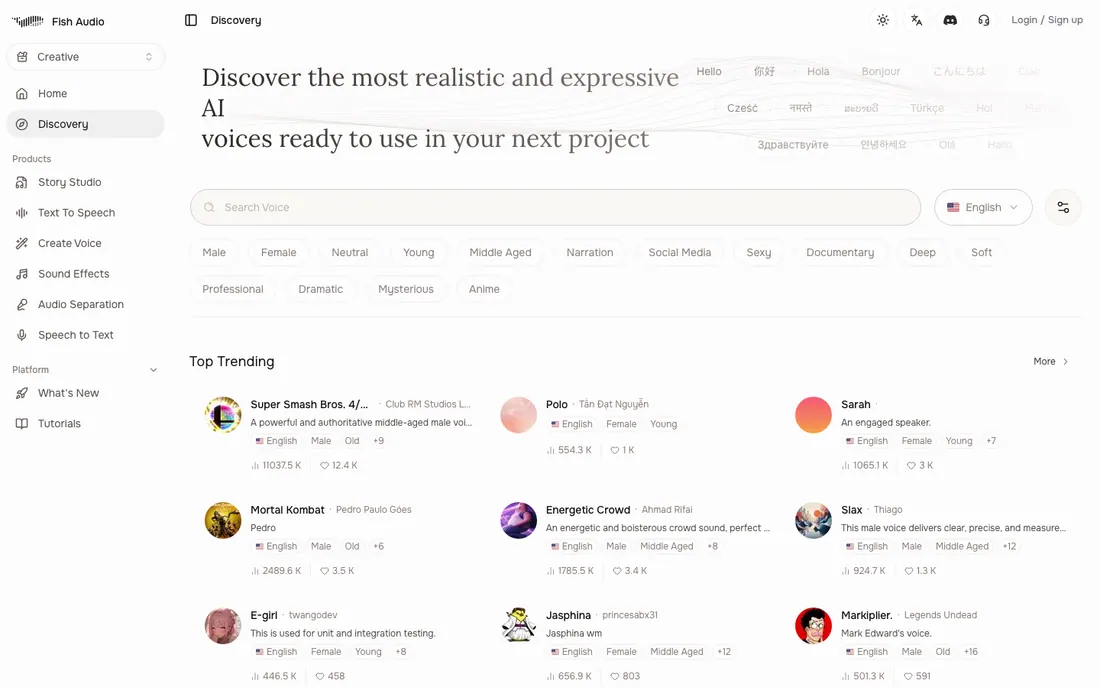
For filmmakers, this is the most immediately useful part of the app. It feels like voice casting: search, filter, preview, and move a promising voice into the TTS workflow. I would use it for scratch dialogue, pitch videos, trailer narration, audiobook-style reads, game-style voices, and early character tests.
Text-to-Speech Feels Built for Direction
The TTS screen is clean and practical. You add a speaker, choose a voice, select a model, then tune basic audio controls such as volume, speed, loudness normalization, text normalization, and tag-compatible mode. It is not overloaded, which is good: the app gets out of the way and leaves room for script direction.
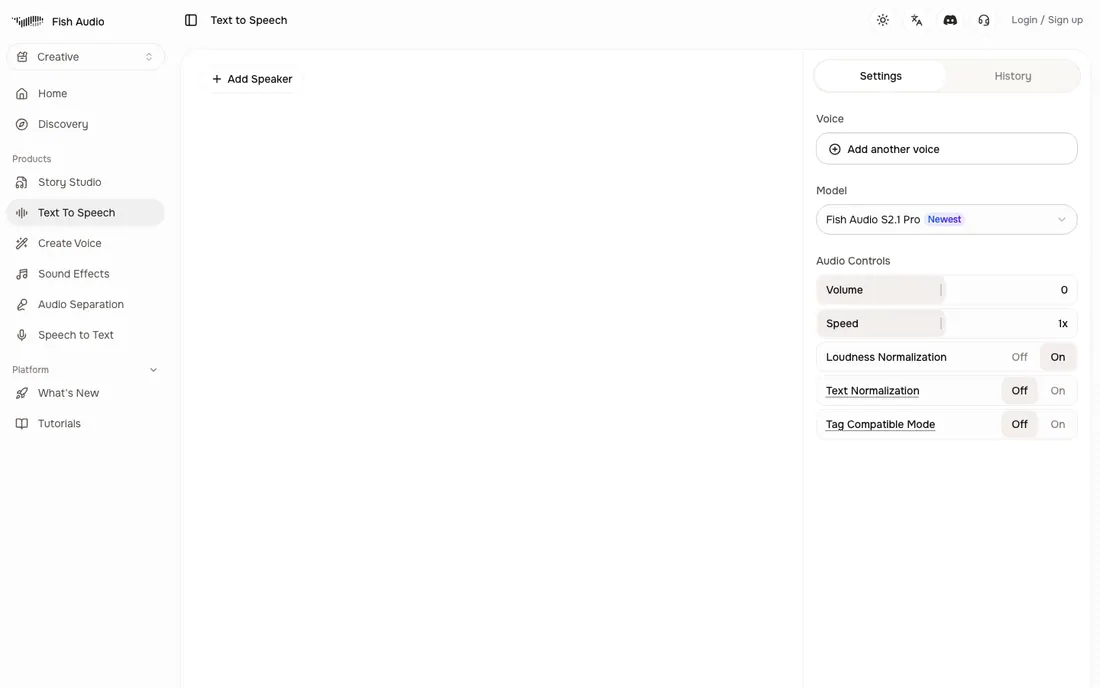
I would not call Fish Audio a full post-production audio suite, but it is strong at the part that matters most for AI voiceover: quickly finding a usable voice and pushing it toward the right delivery.
What I Like About Fish Audio
Fish Audio feels unusually complete for an audio specialist. The same product covers TTS, voice cloning, speech-to-text, realtime streaming, voice management, sound effects, audio separation, Story Studio, and developer API access. That breadth matters if you want one audio stack instead of separate tools for narration, transcription, and voice experimentation.
The other strength is clarity. The app is not trying to look like a video editor or screenplay tool. It is clearly a voice/audio product, and the best screens are focused around casting, generation, and control. For creators, that makes the learning curve lighter than many broader AI studios.
What Could Be Better
Fish Audio is audio-first, so it does not organize a film project for you. There is no story structure, scene planning, shot list, storyboard, AI actor continuity, prompt chain, or video generation workflow. If you are building a full AI short film, you will still need another workspace around it.
The pricing is also credit-based, which means you need to think in minutes, characters, voice slots, and API usage rather than a simple "one plan does everything" subscription. That is normal for AI voice tools, but it can still be harder to estimate if you generate many revisions.
Fish Audio Pricing: Good Free Tier, Bigger Jump for Teams
Fish Audio has a useful free plan with monthly credits, short generation limits, public voice slots, standard speed, and no credit card requirement. The Plus plan is listed at $11/month billed annually and is the first paid tier that feels realistic for regular creator work, with more monthly credits, longer generations, private voice slots, priority generation, Voice Design, and commercial use allowed.
Pro and Max are more clearly for heavier production and teams. Pro adds a much larger credit pool, team seats, higher character limits, unlimited voice slots, and professional voice slots. Max is for large-scale production. Enterprise adds custom volume pricing and compliance-oriented controls.
For API use, Fish Audio is pay-as-you-go. The main TTS models are priced by input text size, with s2.1-pro listed at $15 per million UTF-8 bytes and s2.1-pro-free available for development and testing. Speech-to-text and Voice Design have their own usage pricing, so technical teams should budget web app and API usage separately.
Fish Audio Alternative: Why Melies Can Be a Better Fit
Fish Audio is stronger when you need a specialist voice and audio platform. I would choose it for emotional TTS, voice cloning, realtime voice API, speech-to-text, public voice discovery, and audio experiments that need fine control.
Melies is the better Fish Audio alternative when the audio needs to live inside a complete AI filmmaking workflow. In Melies, voices, music, and sound effects sit next to story development, scenes, AI actors, storyboards, posters, prompts, images, and video generation. If you only need a voice engine, Fish Audio is more specialized. If you are trying to move from idea to finished AI film, Melies is the broader production workspace.
Fish Audio FAQ: Pricing, Features, and Alternatives
Does Fish Audio have a free plan?
Yes. Fish Audio lists a free tier with monthly credits, short generation limits, public voice slots, standard speed, and no credit card required.
How much does Fish Audio cost?
Fish Audio has a free plan, then paid tiers including Plus, Pro, Max, and Enterprise. Plus is listed at $11/month billed annually, while higher tiers add more credits, longer generation limits, team seats, voice slots, API capacity, and professional usage room.
Does Fish Audio support commercial use?
Free plan users can only use generated content for personal, non-commercial projects. Premium subscribers can use voices they own for commercial purposes.
Does Fish Audio have API access?
Yes. Fish Audio supports REST API, SDK, realtime streaming, pay-as-you-go pricing, API keys, and rate limits. API voice generation includes s2.1-pro at $15 per million UTF-8 bytes and s2.1-pro-free for development and testing.
What is the best Fish Audio alternative?
Melies is a strong Fish Audio alternative if you need voices and sound inside a broader AI filmmaking workflow. Fish Audio is better for specialist voice/audio generation and API workflows; Melies is better for story-to-video production with audio included.