Udio is an AI music generator for creating songs from text prompts, uploaded audio, lyrics modes, and style references. It is one of the better-known specialist tools for AI song generation, with a workspace that combines prompt-to-song creation, remixing, extension, inpainting, a public music community, and credit-based usage.
Udio Review: Music Workspace for Songs, Scores, and References
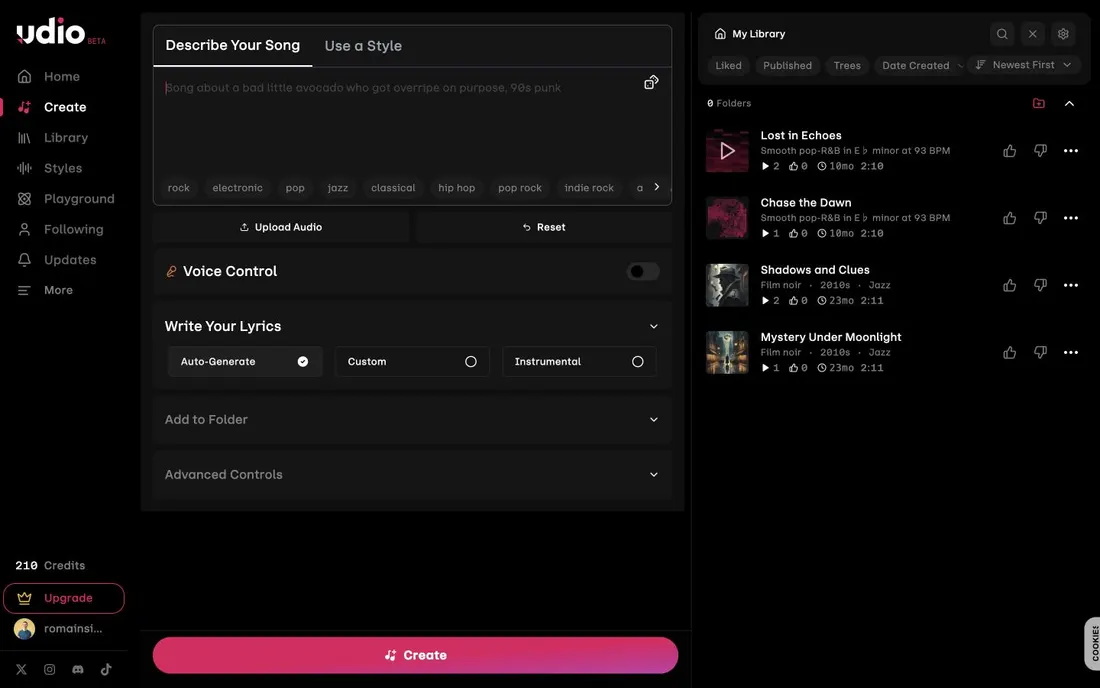
That makes Udio feel like a music workspace rather than a one-off demo. For film use, the most relevant parts are fast temp music, lyrics or instrumental mode, uploaded audio references, and the ability to extend or remix ideas after the first generation.
Udio Discovery: Browsing Other Songs Helps You Prompt Better
Udio also has community and library elements: discoverable songs, track cards, likes, tags, and profile-style browsing. That helps new users understand what the model can produce before they commit to a prompt style.
Udio Features That Matter for Film Music
Udio's product includes:
- Prompt-to-song creation with descriptive text prompts and suggested style tags.
- 30-second and 2-minute generation modes.
- Auto-generated lyrics, custom lyrics, and instrumental mode.
- Upload Audio for using audio as a building block.
- Voice Control on paid plans.
- Editing tools such as remix, extend, inpaint, and uploaded-audio workflows.
- Styles, style reference, custom cover art, library organization, folders, and discovery.
- Helpful guidance for first-song creation, billing, mobile/iOS, downloading, and user safety.
The product is clearly built for music-first creation. It can support film work, but it does not organize shots, scenes, characters, dialogue, storyboards, visual prompts, or video generation.
Udio Pricing: Good Free Testing, Paid Plans for Serious Iteration
Udio uses credits, so the practical question is how much iteration you need. The free plan is useful for testing the workflow, while the paid plans matter if you want longer generations, uploaded audio, Voice Control, editing, and more parallel creation.
- Free: $0/month, 10 credits per day, 100 monthly credits, up to 4 songs at the same time, and a limit of 3 full-length 2:10 song generations per day.
- Standard: $8/month billed annually, $96 billed annually, 2,400 credits per month, 2-minute generations without the free daily limit, up to 6 songs at the same time, Voice Control, music/lyrics editing, uploaded audio, style reference, and custom cover art.
- Pro: $24/month billed annually, $288 billed annually, 6,000 credits per month, up to 10 songs at the same time, and all Standard features.
- Add-on credits: 100 credits for $3 and 1,000 credits for $25.
For film work, I would expect serious creation to move to Standard quickly because uploaded audio, Voice Control, editing, and higher limits are the features that make Udio more useful than a quick demo generator.
What I Like About Udio
The logged-in Create app is clear and fast to understand. The combination of prompt, upload audio, lyrics mode, suggested tags, Voice Control, advanced controls, and a library on the same screen is practical for iterating on music ideas.
Udio also does a good job exposing what the user can control before generation. For filmmakers, instrumental mode and upload audio are especially useful because many projects need score, temp tracks, mood references, or variations rather than fully vocal songs.
What Could Be Better in Udio
Udio is not an AI filmmaking workspace. It does not manage story structure, scenes, characters, shot lists, visual continuity, sound effects, dialogue voices, video models, or project-wide production planning. If your workflow starts with a script or a film concept, Udio is one specialized stop inside the pipeline.
The product also leans heavily on credits and paid feature gates. The free plan is enough to understand the interface, but the most production-relevant controls appear in Standard or Pro.
Udio Alternative: Why Melies Can Be a Better Fit
Udio is stronger when you specifically need standalone AI songs: lyrics, vocals, instrumental music, upload audio, style references, remixing, extending, and inpainting.
Melies is better when music is part of a full AI filmmaking workflow. Melies keeps music to story, scenes, AI actors, prompts, storyboards, voices, sound effects, and video generation. If you are searching for a Udio alternative for film production, Melies is broader and more production-oriented. If you only want to generate songs, Udio remains the specialist.
Udio FAQ: Pricing, Features, and Alternatives
Does Udio have a free plan?
Yes. Udio lists a free plan with 10 credits per day, 100 credits per month, up to 4 songs at the same time, and a daily limit of 3 full-length 2:10 song generations.
Is Udio good for filmmakers?
Udio is useful for generating temp music, songs, instrumentals, references, and soundtrack ideas. It is not a full filmmaking tool because it does not manage scenes, characters, storyboards, voices, sound effects, visual prompts, or video generation.
What is the best Udio alternative?
Melies is a strong Udio alternative if you need music inside a broader AI filmmaking workflow. Udio is better for standalone song generation; Melies is better for story-to-video production where music is one part of the project.