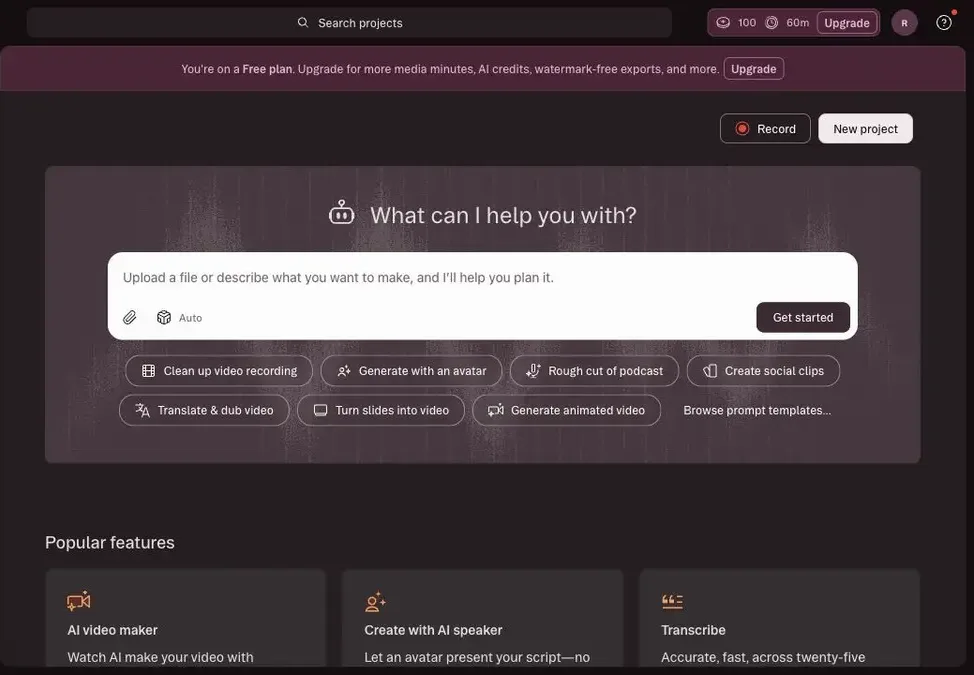
Descript is an AI video and podcast editor built around text-based editing. Instead of only trimming clips on a timeline, you can edit a transcript, remove filler words, improve audio, add captions, generate clips, record your screen, use AI speakers, and ask Underlord, Descript's AI co-editor, to help shape the project.
Descript Review: Excellent AI Editor After You Have Footage
Descript now feels like an AI video editor rather than only a transcript editor. The core promise is still simple: direct an AI co-editor, or edit video yourself with tools that feel as easy as typing.
The strongest shift is Underlord. Descript now talks about an AI video agent that can help write or edit scripts, design video with layouts and transitions, generate custom B-roll, animate static images, visualize data, and make social videos from scratch.
For filmmakers, that is useful but narrower than a full production workspace. Descript is excellent once you have recordings, interviews, podcasts, screen captures, voice, or clips to edit. It is less naturally organized around story development, scene planning, AI actors, shot continuity, music, sound effects, poster generation, and end-to-end film production state.
AI Speakers and Voice
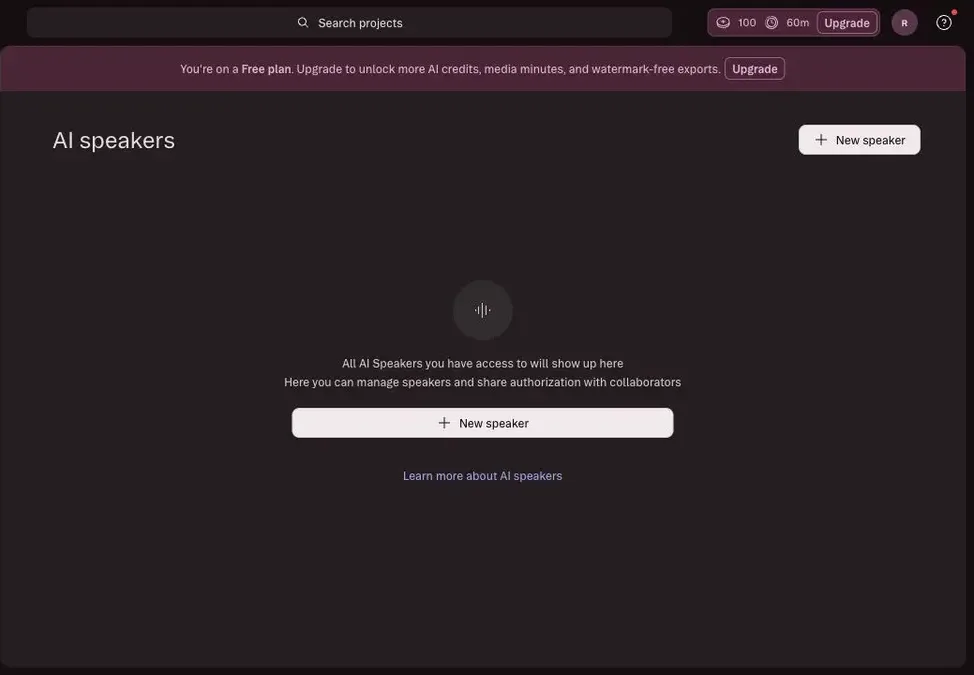
The AI speakers area is built around creating and managing reusable voices. In a new free workspace, it starts as a clean empty state with a clear "New speaker" action, which makes the feature understandable even before a team has built a voice library.
Underlord and Editing Workflow
Underlord is the most important Descript feature to track for Melies. On the product overview, it is positioned as an AI co-editor that can write scripts, give feedback, design videos, change colors and fonts, generate B-roll, animate images, visualize data, and create social videos.
Inside the app, Underlord appears as the central prompt interface. The dashboard prompt said users can upload a file or describe what they want to make, and Descript will help plan it. The suggested workflows are pragmatic: clean up a video recording, generate with an avatar, rough cut a podcast, create social clips, translate and dub video, turn slides into video, and generate animated video.
For a content team, that is strong. For a film team, it is still post-production and content-packaging-first. Melies can position against Descript by owning the earlier creative system: story, scenes, characters, shot prompts, storyboards, generated voices, music, sound effects, posters, and video generation inside one project.
Descript Pricing: Media Hours and AI Credits Drive the Real Cost
The current plans are easiest to compare through media hours and AI credits:
- Free: $0, no credit card required to start.
- Hobbyist: $24/month monthly or $16/month billed annually, 10 media hours/month, 400 AI credits/month, 1080p watermark-free export, Underlord access, Studio Sound, Remove Filler Words, Create Clips, and AI Speech with custom voice clones and video regenerate.
- Creator: $35/month monthly or $24/month billed annually, 30 media hours/month, 800 AI credits/month, 4K watermark-free export, full Underlord access, generative video, royalty-free stock media, advanced export options, reusable custom layouts, and top-ups.
- Business: $65/month monthly or $50/month billed annually, 40 media hours/month, 1,500 AI credits/month, Brand Studio, custom avatars from photo upload or text, translate and dub video in 30+ languages with proofread, priority support, and top-ups.
- Enterprise: custom pricing, advanced security, SSO/SCIM, granular brand controls, custom AI credits, custom media minutes, custom legal terms, custom AI controls, flexible licensing, and flexible billing.
The practical buying question is credits and minutes. Descript's FAQ explains that media hours track uploaded or recorded media, while AI credits track features like Underlord, Studio Sound, Green Screen, Eye Contact, AI-generated media, and avatars.
Descript: What I Like and What Could Be Better
The main trade-off is that Descript is excellent once you already have media, but less natural when you are still developing a film from scratch. Onboarding asks for several business-profile answers before the dashboard, and the free-plan language can be a little hard to reconcile around exports and watermarks.
I would use Descript for editing, repackaging, podcasts, screen recordings, clips, and business video. I would not expect it to replace story bibles, scene management, AI actor continuity, music, sound effects, poster generation, or film-first production planning. The AI speaker, avatar, dubbing, and generation features are powerful, but they also touch voice, likeness, uploads, credits, and paid limits, so I would test those carefully before building a workflow around them.
Descript Alternative: Why Melies Can Be a Better Fit
Descript is a better fit when the job starts with recorded material: podcasts, interviews, tutorials, webinars, screen recordings, customer education, social clips, and spoken business video.
Melies is stronger when the job starts with a film idea. It brings story, scenes, AI actors, prompts, storyboards, posters, voices, music, sound effects, and video generation into one creative workspace.
For people searching for a Descript alternative, the deciding question is where the workflow begins. Descript is the stronger AI editor for recorded content and transcript-led post-production. Melies is the stronger filmmaker-first workspace for developing an actual film project from idea to production assets.
Descript FAQ: Pricing, Features, and Alternatives
Is Descript free?
Yes. Descript has a Free plan for starting with recording, editing, and AI tools. Paid plans are needed when you need higher limits, watermark-free exports, more media hours, more AI credits, and team features.
How much does Descript cost?
Descript paid plans start with Hobbyist at $16/month billed annually. Creator starts at $24/month billed annually, Business starts at $50/month billed annually, and Enterprise is custom.
Is Descript good for filmmakers?
Descript is useful for editing recorded footage, interviews, podcasts, tutorials, captions, clips, dubbing, and voice workflows. It is less complete for story development, scenes, AI actors, storyboards, music, sound effects, and full film production planning.
What is the best Descript alternative?
Melies is a strong Descript alternative if you want to start from the film project itself. Descript is better for editing recorded content; Melies is better for building story, scenes, AI actors, prompts, storyboards, voices, music, sound effects, posters, and video generation together.