Opus Clip is an AI video repurposing tool. Its promise is simple: upload or link a long video, then get short social clips with AI-selected moments, captions, reframing, editing, and publishing support.
Opus Clip Review: Excellent for Repurposing Footage, Not Making Films From Scratch
Opus Clip is worth using when you already have long-form footage and want a fast way to turn it into short social clips. Inside the dashboard, the workflow is centered on pasting a video link, uploading a file, importing from Google Drive, and then using AI tools for clipping, subtitles, editing, voice enhancement, sound effects, reframing, B-roll, hooks, upscaling, and script-to-video.
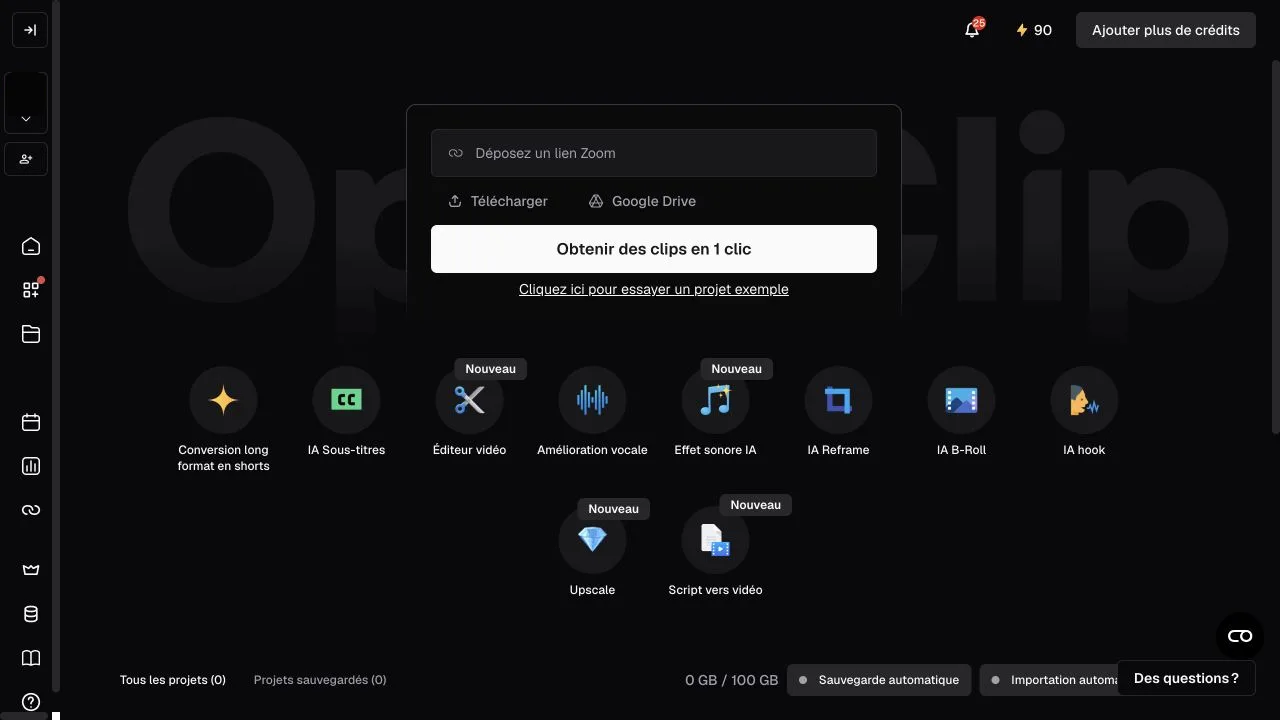
For creators and teams with podcasts, webinars, interviews, livestreams, explainers, or talking-head videos, the workflow is strong. Opus Clip supports many source platforms on Pro, including YouTube, Google Drive, Vimeo, Zoom, Rumble, Twitch, Facebook, LinkedIn, X, Loom, Riverside, and StreamYard, plus English, German, Spanish, French, Portuguese, and more languages.
For AI filmmakers, the fit is narrower. Opus Clip is mostly a post-production and distribution tool. It helps when you already have long footage and need social clips. It does not help much with story development, scene planning, character consistency, AI actor creation, storyboard generation, prompt iteration, voice/music/sfx generation, or final film asset management.
Main Features for Video Teams
The product and plans position Opus Clip around these workflows:
- AI clipping with virality scoring.
- Automatic animated captions in 20+ languages.
- AI reframe for vertical, square, and horizontal formats.
- AI B-roll on paid plans.
- Filler and silence removal.
- Social posting to YouTube Shorts, TikTok, Instagram Reels, or download.
- Brand templates and custom fonts on higher tiers.
- Team workspace and social account connections on Pro.
- Export to Adobe Premiere Pro and DaVinci Resolve on Pro.
- API and custom integrations for Business.
This is very practical for content operations. The product is less of a creative ideation tool and more of a throughput tool for turning existing video into platform-ready clips.
Opus Clip Pricing: Credits Make Sense for Social Clip Volume
- Free: USD $0/month, 60 credits/month, up to 1080p rendered clips, auto reframe, AI captions with emoji and keyword highlighter, watermark, no editing, and clips no longer exportable after 3 days.
- Starter: USD $15/month, 150 credits/month, AI clipping with virality score, captions in 20+ languages, auto-posting or download, editor, one brand template, filler and silence removal, and watermark removal.
- Pro: USD $29/month or USD $14.50/month billed yearly, USD $174 billed annually, 3,600 credits/year, team workspace with 2 seats, 2 brand templates, 6 social account connections, AI B-roll, 10+ input sources, Premiere Pro and DaVinci Resolve export, multiple aspect ratios, scheduler, chat support, custom fonts, speech enhancement, and limited API access.
- Business: custom pricing and packs, priority processing, customized credits, team seats, social connections, tailored business assets, dedicated storage, API/custom integrations, MSA, priority Slack support, and enterprise-level security.
Credits are the clearest way to think about Opus Clip pricing, because each plan is really about how much repurposing volume you need.
Opus Clip: What I Like and What Could Be Better
What I like most is how clear the dashboard feels. The app is built around a very direct job: add a link or upload a long video, then turn it into short clips. The tool shortcuts for captions, voice enhancement, AI reframe, B-roll, hooks, upscaling, and script-to-video make it easy to understand what Opus Clip is good at within a few minutes.
I also like that it is practical for teams that publish often. Brand templates, social account connections, scheduling, multi-source import, Premiere Pro export, DaVinci Resolve export, and Business API options make sense for content operations, not only solo creators.
The main trade-off is that Opus Clip depends on having existing long video. It does not create a film from a story brief. The free plan includes watermarking and no editing, and clips become non-exportable after 3 days. The workflow is optimized for social clips, not narrative filmmaking.
Another limitation is it does not manage scripts, AI actors, storyboards, prompts, voices, music, sound effects, posters, or AI video generations as a unified film project.
Opus Clip Alternative: Why Melies Can Be a Better Fit
Opus Clip is better when you already have a finished long video and want social clips. It is a repurposing and distribution accelerator.
Melies is better when you are still building the film.
connects scripts, scenes, AI actors, storyboards, prompts, voices, music, sound effects, posters, and video generation in one project workspace.For someone searching for an Opus Clip alternative, the question is workflow stage. If the job is clipping a podcast or webinar, Opus Clip is specialized. If the job is creating an AI film from idea to assets, Melies is the more complete filmmaking workspace.
Opus Clip FAQ: Pricing, Features, and Alternatives
What is Opus Clip?
Opus Clip is an AI video repurposing platform that turns long videos into short clips for social platforms, with AI clipping, captions, reframing, editing, and scheduling tools.
Can Opus Clip create videos from scratch?
Not in the same way as an AI filmmaking workspace. Opus Clip is primarily for repurposing existing videos. It can add editing, captions, B-roll, voice-over controls, and enhancements, but it is not built around scripts, scenes, actors, or generative film planning.
How much does Opus Clip cost?
Opus Clip has a Free plan, Starter at USD $15/month, Pro at USD $29/month or USD $14.50/month billed yearly, and Business custom pricing.
Is Opus Clip good for filmmakers?
It is useful for marketing and distribution after a filmmaker has long-form footage. It is not enough for the earlier filmmaking workflow: script, scenes, storyboards, character consistency, prompts, generated voices, music, sound effects, posters, and video generation.
What is the best Opus Clip alternative?
Melies is a strong Opus Clip alternative for AI filmmakers who need a full production workspace rather than only long-video-to-shorts repurposing.