Hedra has moved far beyond its early talking-character positioning. It now feels like a broad creative AI workspace: part agent, part video generator, part image studio, part voice tool, and part template library.
That makes the current Hedra review different from a simple talking avatar review. Hedra still matters for lip-sync, character video, talking photos, and avatar-style content, but the product now looks closer to a general creative workspace with an agent on top.
Hedra Review: Broad Creative Studio, More Creator-Led Than Film-Led
My favorite thing about Hedra is how quickly the product communicates its ambition. The home screen is built around an agent prompt, but the left sidebar immediately exposes the real creative tools: Video, Image, Speech, Edit Video, Templates, Library, and Search.
That makes Hedra feel useful if you want to explore a lot of AI creative directions from one place. It is less focused than a dedicated film production workspace, but it is much richer than a one-off talking avatar generator.
Hedra Video Workflow: Guided Templates, Seedance, and Creative Limits
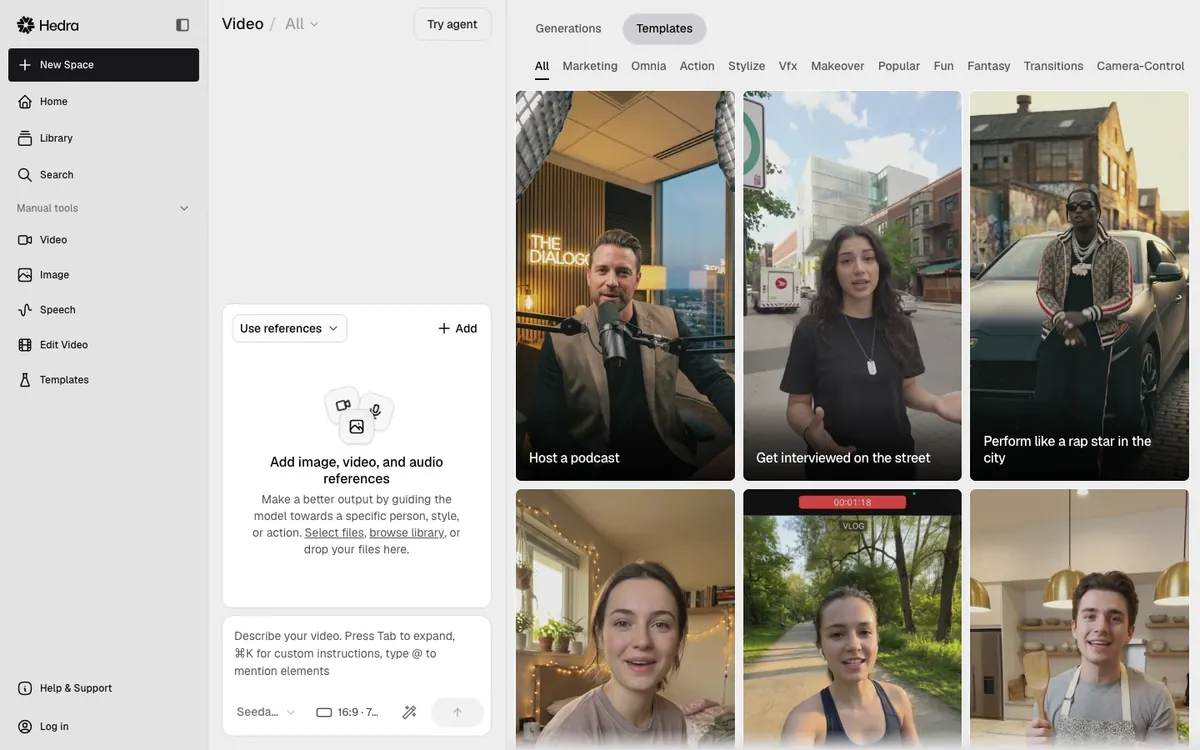
Hedra's Video Studio is the most visually complete surface in the product. It includes a reference input panel, a prompt box, model settings, aspect ratio, duration, template categories, and a gallery of ready-made video templates.
In this workspace, the visible default model was Seedance 2.0, with a 16:9, 720p, 8-second setup. The template grid included prompts like hosting a podcast, getting interviewed on the street, product review to camera, powering up like an anime hero, and cinematic transformation ideas.
This makes Hedra feel useful for creator-style content and social video ideation. It is less of a blank technical generator and more of a guided creative studio.
Hedra Image Studio Review: Useful References, Limited Control
The Image Studio is simpler but still useful. It lets users generate images from elements, reference images, and a text prompt, with model, aspect-ratio, and resolution controls in the same surface.
The generation step is tied to Hedra's account and credit system. That is sensible for a credit-based product, but it means the interface is easier to evaluate than the actual output quality until you are ready to spend credits.
Hedra Audio and Speech Review: Helpful, but Not the Main Reason to Use It
Hedra also includes an Audio or Speech surface. The page shows a voice named David, a text/audio generation area, a Generate button, and a history panel where audio generations appear.
For AI filmmakers, this matters because Hedra is not only a video model wrapper. It is trying to combine voice, visuals, templates, and editing in a single credit-based workspace.
Hedra Models and Credits: Flexible, but Hard to Predict
Hedra packages video generation, image creation, character animation, and voice inside one studio with shared credits. Its model lineup highlights Kling AI, Nano Banana, AI Agent, and Veo.
The useful buyer takeaway is not just "Hedra has models." It is that Hedra is packaging many models behind an agent and a credit system. The app can choose or expose models depending on the task, which is valuable for creators who do not want to maintain separate subscriptions for Kling, Veo, image tools, and voice tools.
Hedra Pricing: Shared Credits Are Convenient, but Hard to Forecast
Hedra's pricing is credit-based, with a free start path and paid monthly plans:
- Basic: $15/month, 1,500 credits/month, slower generations, commercial use, monthly credits do not roll over.
- Creator: $30/month, 5,400 credits/month, faster generation, commercial use, extra credit purchases, monthly credits do not roll over.
- Professional: $75/month, 14,400 credits/month, fastest generation, commercial use, extra credit purchases, Teams plan access, monthly credits do not roll over.
- Teams: $75/month, 14,400 credits/month, fastest generation, commercial use, extra credit purchases, Teams plan access.
- Enterprise: custom pricing, custom credits, commercial use, Slack technical support, fastest video processing, dedicated account manager, forward deployed engineers, private deployments, SSO, team management, legal and security review.
The practical limit is credits: video, image, and audio all draw from the same pool, and different models cost different amounts. That makes Hedra flexible, but it also means serious users need to watch the credit burn before making it a daily production tool.
Hedra looks like an actively developed product. Its current direction focuses heavily on creative agents, reusable skills, reference-image workflows, AI voice, model comparisons, and multi-shot video direction.
The practical takeaway is that Hedra is not standing still. It is trying to become a creative operating system around prompts, skills, models, images, video, and voice.
Hedra: What I Like and What Could Be Better
What I like most is that Hedra has moved well beyond the narrow talking-avatar category. Video, image, voice, templates, library, search, and editing tools sit in one workspace, and the Video Studio templates are useful for quick creator-style outputs. The agent and reusable-skill direction also makes Hedra feel more ambitious than a simple generation tool.
The trade-off is that Hedra is broad but not especially film-structured. You need an account before real generation, monthly credits do not appear to roll over, and costs can be hard to predict because different media types consume credits differently. I would compare it seriously for creator and marketing workflows, while
feels more naturally organized around narrative AI filmmaking.Hedra Alternative: Why Melies Can Be a Better Fit
Hedra is best if you want a creative AI agent that can help make videos, images, voices, talking-avatar assets, templates, and campaign-style creative outputs from one workspace. It is especially interesting for creators, marketers, agencies, and teams that want one credit pool across multiple visual and audio models.
Melies is better if your goal is to make an AI film from a story. Melies starts from narrative structure: story, scenes, AI actors, storyboards, prompts, voices, music, sound effects, posters, and production assets.
If you are searching for a Hedra alternative, the decision is about structure. Hedra is an agent-led creative production workspace. Melies is a filmmaker-first AI studio for turning a story into a complete film package.
Hedra FAQ: Pricing, Features, and Alternatives
What is Hedra?
Hedra is a creative AI agent and studio for video, image, audio, talking avatars, templates, model access, and campaign-style creative workflows.
Is Hedra free?
The plans say users can start free and upgrade anytime. The paid plans currently started at $15/month.
How much does Hedra cost?
Hedra's paid plans start with Basic at $15/month, then Creator at $30/month, Professional at $75/month, Teams at $75/month, and Enterprise custom pricing.
What models does Hedra include?
Hedra highlights Kling AI, Nano Banana, AI Agent, and Veo. The app also showed Seedance 2.0 in Video Studio and GPT Image 2 Medium in Image Studio.
Is Hedra only for talking avatars?
No. Hedra still supports talking-avatar and character video use cases, but the current product is broader: creative agent, video generation, image generation, audio, templates, edit video, library, search, and multi-model workflows.
What is the best Hedra alternative?
Melies is a strong Hedra alternative if you want a story-first AI filmmaking workspace with scenes, AI actors, storyboards, prompts, voices, music, sound effects, posters, and production assets.