Akool is a broad AI video suite for creators who want image-to-video, text-to-video, video-to-video, talking photos, avatars, face swap, video translation, voice tools, and API access in one place. I see it as a strong marketing and localization platform first, and a filmmaking tool second: it is powerful, but it is not organized around scripts, scenes, characters, and story continuity the way a narrative production workspace is.
Akool Review: Powerful Marketing Video Tools, Less Calm for Narrative Work
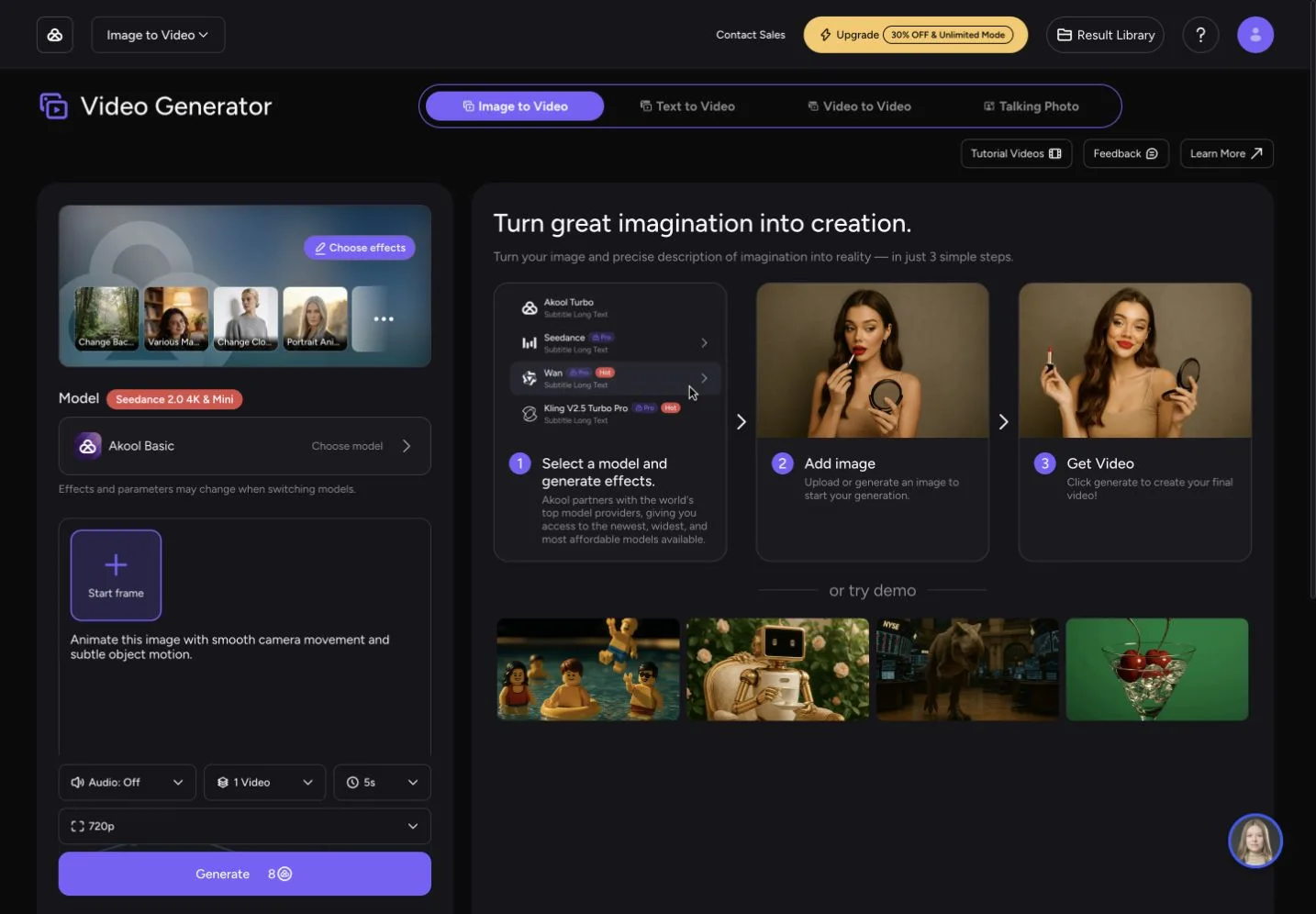
The editor is dense and useful, but it also feels built around short-form production and marketing templates. Akool's positioning emphasizes enterprise usage, high-volume content creation, API access, and model choice. It is impressive for a marketer, but less calm than a film production workspace.
Akool Features: Avatars, Translation, Face Swap, and Model Choice
AI Video Generation
Akool's image-to-video workflow is built for quick photo-to-video experiments. The model picker includes options such as Akool, Wan, Kling, Seedance, Hailuo, Veo, Sora, and Vidu, with controls for duration, resolution, and generation cost. It is practical for short clips, but less story-structured than a filmmaker-first workspace.
Streaming Avatar
Streaming Avatar is one of Akool's most distinctive features. Akool frames it around real-time avatar chat via voice, text, or camera, plus avatar examples for roles like nurse, history guide, flight attendant, and other scenario-specific presenters.
Video Translation
Akool's video translation page says it supports more than 155 languages, 4K video, 5 minutes of free video, 5GB file support, and realistic lip-sync. The page is very clearly aimed at global marketing, webinars, education, and localization. This is one of Akool's strongest use cases compared with pure AI video generators.
Face Swap and Image Generation
Akool includes face swap, live face swap, character swap, head swap, hair swap, talking photo, image generator, image-to-image, background change, and ecommerce product ad tools. This makes it strong for campaign variants, translated clips, virtual presenters, and social content.
Model Choice and Workflow Flexibility
Akool's model picker is one of the reasons the product feels useful for fast video experimentation. It packages several popular image-to-video and video-generation options inside the same editor, so a creator can compare styles without rebuilding the workflow from scratch each time.
Akool: What I Like and What Could Be Better
What I like most is the amount of video utility packed into one account. The image-to-video editor gives quick access to model choice, effects, prompt controls, audio settings, duration, resolution, and example prompts. For campaign work, translated presenter videos, avatar demos, product clips, or face-swap experiments, that breadth is genuinely useful.
What I like less is the feeling of complexity. Between credits, model names, upgrade banners, unlimited mode, add-ons, avatar products, translation tools, API messaging, and marketing examples, Akool can feel busy before you even generate. For a filmmaker trying to develop a story, the workflow is less structured than a workspace that starts from scenes, characters, shots, and assets.
Akool Pricing: Useful Credit Plans, Confusing Buying Experience
Akool pricing is one of the more confusing parts of the product. The plan experience combines an annual/monthly toggle, credit packs, add-ons, unlimited mode messaging, promotional banners, and multiple plan cards.
Starter includes 200 credits at $12/seat/month when billed annually, or $144/year. Pro, Pro Max, Business, and Enterprise tiers add higher resolution, longer videos, more concurrency, template access, avatar options, faster processing, and commercial or enterprise controls.
Akool Alternative: Why Melies Can Be a Better Fit
Akool is strongest for marketing operations: avatars, translation, face swap, ecommerce product content, real-time avatar demos, and API-led media generation. Melies is stronger when the job is end-to-end AI filmmaking: story, characters, AI actors, storyboards, posters, voice, music, and video clips organized in one project workspace.
For creators searching for an Akool alternative, Melies is usually a better fit when you want narrative control and film assets rather than a collection of campaign generators.
Akool FAQ: Pricing, Features, and Alternatives
Is Akool suitable for beginners?
Yes, especially for short marketing videos, avatar clips, face swap, translation, and quick image-to-video tests. The interface is dense, but the main generation flow is understandable.
Can I use Akool for commercial projects?
Yes, but the license depends on the plan. Akool separates personal and business license language, so teams should check their tier before using generated assets in paid client or brand work.
Does Akool offer a free trial?
Yes, Akool provides a free plan with limited features, enabling users to explore the platform before committing to a paid subscription.
How does Akool's Video Translation maintain lip-sync accuracy?
Akool is built around translated speech plus lip-sync, so it is useful when the goal is to localize presenter-style videos without reshooting them.
Are there any limitations on video length or file size?
Yes, limitations vary depending on the subscription plan. Higher-tier plans offer increased allowances for video length and file size.
Is customer support available for all users?
Customer support is available, with priority support provided to users on higher-tier subscription plans.