ImageMover AI is an image-to-video and template-based AI video generator. It is not a full filmmaking workspace, but it gives creators a quick way to turn a still image into a short generated video with model choices, prompt controls, duration, resolution, and credit-based pricing. I would choose it for an occasional single-shot animation, not for a project that needs scene planning or continuity across many shots.
ImageMover AI Review: Fast Image-to-Video Utility, Not a Film Workspace
ImageMover exposes its main generator immediately, which made the workflow easy to inspect without first entering an account: image upload, prompt box, template selector, model tabs, duration, resolution, audio, generation cost, history, and a sample video preview.
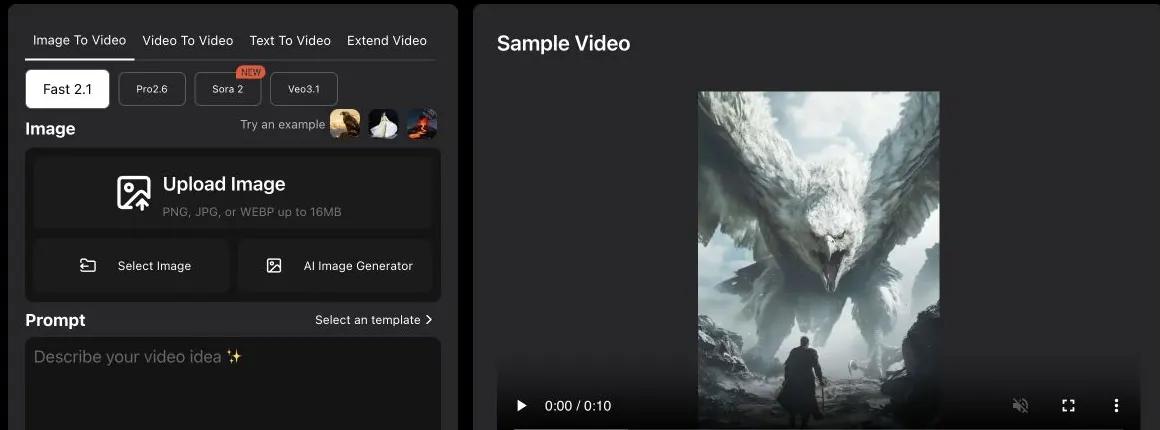
The product feels optimized for fast social clips and viral templates more than film production. The left navigation includes Image To Video, AI Video & Templates, AI Image, AI Avatar, and My Creations. It also promotes many template/use-case flows, including dance, kissing, bikini, jiggle, product videos, pets, action, sci-fi, talking avatars, and video expand.
That access was enough to judge the workflow and controls, but not the quality of a freshly generated clip. I did not complete a paid generation in this review, so the sample video should be treated as the product's example, not as my test result.
ImageMover AI Features: Image-to-Video, Templates, Models, and Upscaling
Image to Video
The primary workflow is image-to-video. You upload a PNG, JPG, or WEBP image up to 16MB, add a prompt, choose a model, set duration/resolution, and generate a short clip.
Multiple Video Models
The generator exposes several model tabs rather than hiding the model choice. The available names can change quickly, so I would check the generator itself before buying credits for one specific model.
Templates and Viral Tools
ImageMover has a large set of template-style creation paths. That makes the product easy to scan when you want a quick social format, but less useful if you need consistent characters, scene planning, or cinematic continuity.
Text to Video, Video to Video, and Extend Video
The generator tabs include Image To Video, Video To Video, Text To Video, and Extend Video. These broaden the product beyond photo animation, although the current product still centers image-to-video.
Video Upscaling and Add-ons
AI Video Upscaler, AI Rewrite, and Add Audio are also credit-consuming tools. Upscaling costs are separate from generation.
ImageMover AI Pricing: One-Time Credits Are Easy to Understand
ImageMover does not use the usual monthly subscription model. It sells one-time credit packs, which is convenient for occasional use because there is no recurring plan to maintain.
ImageMover says purchased credits remain valid and that failed or abnormal generations may be considered for compensation. Its plans are dynamically rendered and can change, so confirm the current pack sizes and generation cost before purchase.
For budgeting, the useful comparison is cost per usable clip, not the largest "up to" video count. A 10-second 1080p generation uses more credits than the 720p baseline used in the pack estimates, and retries can change the real cost of a finished shot.
ImageMover AI: What I Like and What Could Be Better
What I like most is that the generator is visible right away. Clear model tabs and generation controls make the product easy to evaluate. One-time credit packs are easier to understand than subscriptions for occasional users. Use-case coverage is broad across image-to-video, photo-to-video, script-to-video, video expand, and viral templates. It supports short social/video ad workflows quickly.
What could be better is the filmmaking structure around those clips. ImageMover is useful when you already have an image and want motion quickly, but it does not feel built for managing scenes, character continuity, storyboards, shot lists, voices, sound design, or a multi-shot project. The template catalog also leans heavily toward viral/social formats, which may be useful for creators but less aligned with narrative filmmaking.
ImageMover AI Alternative: Why Melies Can Be a Better Fit
ImageMover AI is strongest when you want to animate a single image or use a quick template for social content. It is a lightweight image-to-video utility with credit packs.
Melies is stronger when you want to make an AI film. It is organized around story development, scenes, AI actors, storyboards, posters, prompts, voices, music, sound effects, and production assets. If you are searching for an ImageMover alternative for filmmaking, Melies is the better fit because it supports the whole creative project rather than only a short clip generator.
For quick image animation, ImageMover is practical. For an actual AI filmmaking workflow, Melies is more complete.
ImageMover AI FAQ: Pricing, Features, and Alternatives
What is ImageMover AI?
ImageMover AI is an AI video generator focused on turning images into short videos. It also promotes text-to-video, video-to-video, extend video, AI avatar, and template-based tools.
Is ImageMover AI free?
ImageMover exposes the generator before account access and sells usage through one-time credit packs. Confirm any current free allowance inside the product.
How many credits does ImageMover AI use?
Credit use depends on the selected model, duration, and resolution. Check the cost shown beside the Generate action before submitting a clip.
What is the best ImageMover alternative?
Melies is a strong ImageMover alternative if you need an AI filmmaking workspace with story, scenes, actors, storyboards, voices, music, and prompts rather than only image-to-video templates.