Kling AI is one of the strongest dedicated AI video tools for filmmakers. It is no longer just a text-to-video model: the product feels like a full creative studio with video generation, image generation, motion control, Avatar, Omni, Canvas, Effects, desktop apps, API access, and a steady push toward more cinematic control.
My take: Kling is excellent when you want a powerful video model and direct control over generation settings. It is less complete when you need to organize a whole film project around story, characters, scenes, sound, and multiple models.
Kling AI Review: Serious Video Generation for Filmmakers
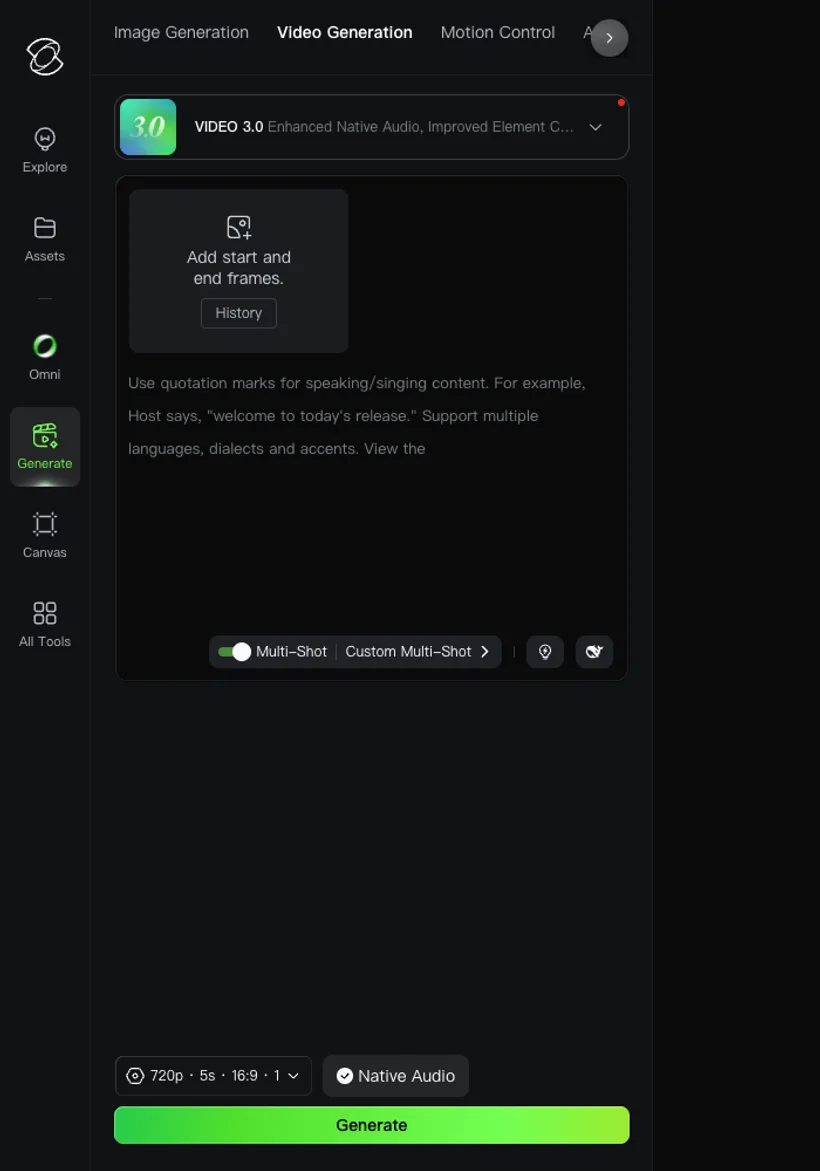
The generator is immediately oriented around video creation. The VIDEO 3.0 panel exposes start and end frames, Multi-Shot, Custom Multi-Shot, duration, aspect ratio, native audio, and a prominent Generate button. Even before producing an output, the interface makes it clear that Kling is built for motion and shot control rather than generic content creation.
Kling AI Features That Matter for Creators
VIDEO 3.0 and Native Audio
Kling VIDEO 3.0 is the main reason filmmakers should pay attention. The official guide describes native audio, improved element consistency, multi-shot narratives, 3-to-15-second flexible durations, and multilingual dialogue support. In the app, the prompt helper even nudges you to use quotation marks for spoken or sung lines, which makes the product feel more aware of performance than many AI video generators.
Multi-Shot Storytelling
The Multi-Shot and Custom Multi-Shot controls are a big deal. A single-shot clip can be beautiful but hard to use in a scene. Kling's multi-shot workflow is more filmmaker-friendly because it can think in coverage, camera changes, and short narrative beats.
Motion Control
Motion Control is another strength. It gives Kling a more practical path for users who care about action, body movement, camera movement, and repeatable direction. For AI film work, that matters more than just making a pretty clip.
Native 4K and Production Push
Kling also pushes toward higher-end output with native 4K options in the VIDEO 3.0 series. I would still budget carefully, because high-resolution AI video can burn credits quickly, but it is useful to see Kling aiming beyond social-first previews.
Omni, Canvas, Effects, and API
The broader app includes Omni, Canvas, Effects, All Tools, and developer API access. That gives Kling more depth than a simple generator: creators can explore different modes, while technical teams can integrate Kling into production pipelines.
Kling AI Pricing: Strong Model Access With Credit Complexity
Kling pricing has two layers: consumer plans for creators and API pricing for developers or production teams. Consumer pricing and promotions can vary, so I would always check the live subscription panel before buying.
The API side is more transparent: Kling's official developer pricing lists 1 unit at $0.14 and breaks costs down by model, billing type, and resolution. That is helpful for teams building around Kling, but it also means creators need to pay attention to credit burn. VIDEO 3.0, native audio, 4K, Omni, Motion Control, Avatar, and Effects can have very different practical costs.
What I Like About Kling AI
I like Kling because it feels purpose-built for video. Multi-Shot, native audio, start/end frames, element consistency, motion control, Canvas, and API access all point in the same direction: more control over cinematic generation.
It is also one of the tools where model progress is visible in the product. The interface does not feel abandoned or generic; it feels like Kling is actively competing at the high end of AI video.
What Could Be Better
Kling is still more of a generation studio than a complete AI filmmaking workspace. It helps you create shots, but it does not naturally organize a full film around scripts, characters, scene lists, storyboards, production assets, music, and sound design.
The other friction is cost planning. Kling is powerful, but the mix of subscriptions, credits, API units, native audio, 4K, and model-specific options means you need to watch spend closely when iterating.
Kling AI Alternative: Why Melies Can Be a Better Fit
Kling AI is best when you want direct access to a leading AI video generator with motion control, native audio, 4K, and API options. It is a powerful generation engine.
Melies is better when you want to organize a whole AI film project: story, scenes, AI actors, storyboards, posters, prompts, voices, music, sound effects, and production planning. Melies can use multiple models as part of a broader filmmaking workflow, while Kling is primarily a model and creative studio.
If you are searching for a Kling AI alternative for filmmaking, Melies is the stronger project workspace. If you only need Kling's specific video model capabilities, Kling remains a top dedicated generator.
Kling AI FAQ: Pricing, Features, and Alternatives
What is Kling AI?
Kling AI is an AI creative studio for video, image, sound, motion control, effects, Canvas, Omni, and API workflows.
What is Kling VIDEO 3.0?
Kling VIDEO 3.0 is the current model series promoted in the app. It supports native audio, multi-shot storytelling, stronger element consistency, and related Omni workflows.
How much does Kling AI cost?
Kling AI has a free tier, paid consumer plans, and API pricing for developer usage. The official API page lists 1 unit at $0.14, while consumer plan promotions can change by account and region.
What is the best Kling AI alternative?
Melies is a strong Kling AI alternative for filmmakers who need a full project workspace around story, scenes, actors, storyboards, voices, music, and prompts rather than only video generation.