Vidu is an AI video and image creation platform focused on fast prompt-to-video workflows, reference-based character/object consistency, templates, and creator tools. It is more substantial than a simple text-to-video page: the product has a real app surface with Reference to Video, Image to Video, Text to Video, Images, Tools, Assets, Claw, Agent, and Templates.
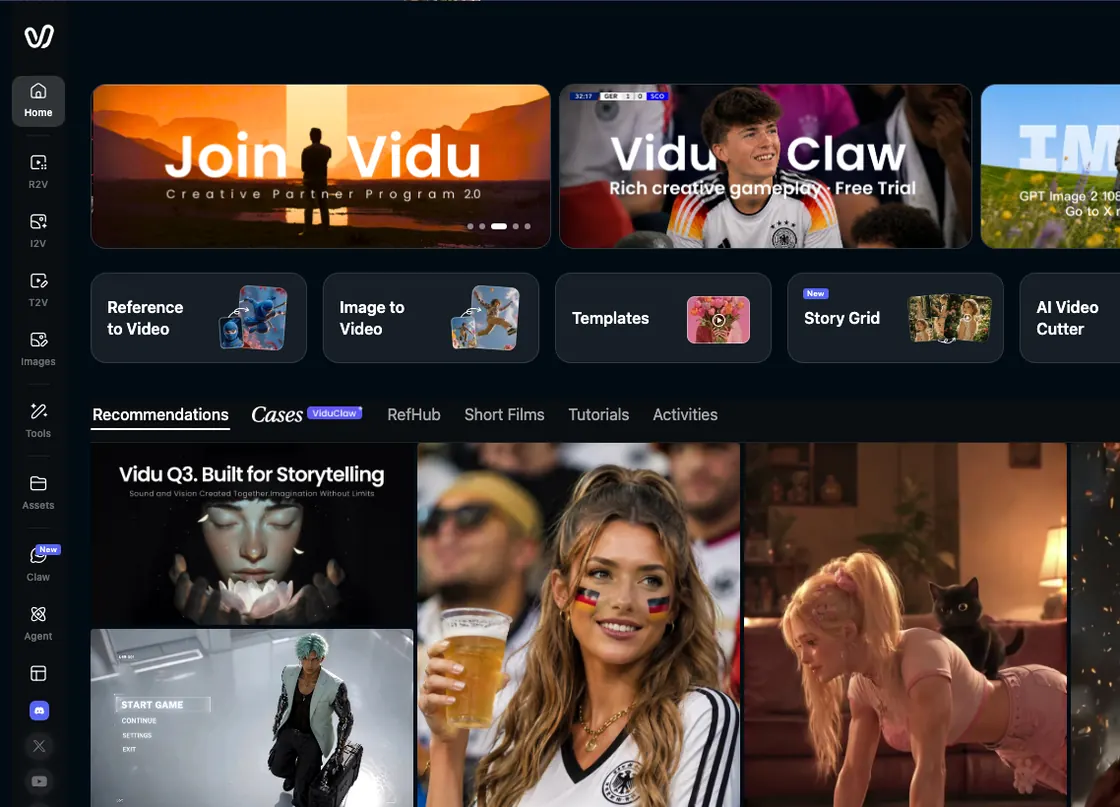
Vidu's dashboard is built around quick entry points for reference video, image-to-video, templates, Story Grid, Claw, and utility tools.
Vidu Features: Reference-to-Video and Consistent Subjects
Reference to Video
Vidu's strongest filmmaking feature is Reference to Video. It is built around subject consistency for characters, objects, and scenes, with multi-reference workflows that can use several images. For filmmakers, this is important because continuity matters more than one-off clip quality.
Image to Video and Text to Video
The app navigation exposes Image to Video and Text to Video as first-class workflows. These are the expected core modes for an AI video generator: start from a prompt, start from an image, or combine prompt direction with visual references.
Vidu Claw and Agent
Vidu Claw appears as a creative assistant or agent-style workflow. The dashboard frames it as a richer creative companion, while paid tiers unlock essential, more, or full Agent features depending on the plan.
Templates and Utility Tools
The app surfaces many quick tools: Story Grid, AI Video Cutter, Text to Speech, AI Lip Sync, AI Face Swap, AI Video Remaker, One-Click Video Generator, AI Video Editor, Video Enhancer, AI Sound Effect Generator, and AI Image Generator. This breadth is useful for social video and creator workflows, but it can make the app feel like a mixed toolbox rather than a structured film production workspace.
Vidu Pricing: References, Credits, and Resolution Limits
Vidu's plans are credit-based, with annual billing positioned as the cheaper option:
- Free: $0/month, 10 references/month.
- Standard: $8/month, billed yearly as $96, with 800 monthly credits and up to 200 videos.
- Premium: $28/month, billed yearly as $336, with 4,000 monthly credits and up to 1,000 videos.
- Ultimate: $79/month, billed yearly as $948, with 8,000 monthly credits, Off-Peak Mode up to 200 videos daily, and full Agent access.
Paid plans include longer video generation, high-quality generation, batch generation, prompt professional editing mode, H.265 Pro/H.264 Pro, commercial use, credit add-on discounts, and different monthly subject creation quotas.
What I Like About Vidu
Vidu feels fast to understand. The dashboard puts the main creation paths in front of you, and the Reference to Video workflow is especially relevant for creators who care about continuity across characters, objects, or visual style.
I also like the breadth of utility tools. Lip sync, face swap, video cutting, sound effects, templates, and enhancement tools make Vidu feel useful for short-form content teams that need to move quickly without opening a separate app for every small task.
What Could Be Better
The same breadth can make Vidu feel less focused for narrative filmmaking. It is strong for generating and manipulating clips, but it does not guide the whole project from story to scenes to production assets.
Pricing also depends on credits, references, generation length, quality settings, and plan limits. That is normal in AI video, but filmmakers should expect some trial and error before knowing what a real project will cost.
Vidu Alternative: Why Melies Can Be a Better Fit
Vidu is strongest when you want a fast AI video generator with reference-based creation, creator templates, and utility tools such as lip sync, face swap, video cutter, and sound effects. It is well suited to short-form creators and teams who want to produce clips quickly.
Melies is stronger when you want to build an AI film project, not just generate individual assets. Melies organizes story, scenes, AI actors, storyboards, posters, prompts, voices, music, sound effects, and production assets in one workflow. If you are searching for a Vidu alternative for filmmaking, Melies is the better fit when project structure and creative continuity matter more than one-off generation.
Vidu FAQ: Pricing, Features, and Alternatives
What is Vidu?
Vidu is an AI image and video creation platform with Reference to Video, Image to Video, Text to Video, Vidu Q3, Vidu Claw, templates, and utility tools for editing, lip sync, face swap, sound effects, and video enhancement.
Is Vidu free?
Yes. Vidu has a Free plan at $0/month with 10 references/month. Paid annual plans start at $8/month.
How much does Vidu cost?
Vidu annual pricing lists Standard at $8/month, Premium at $28/month, and Ultimate at $79/month. Monthly billing can differ, and credit-based limits may change.
What is the best Vidu alternative?
Melies is a strong Vidu alternative for filmmakers who need a structured AI filmmaking workspace around story, scenes, actors, storyboards, prompts, voices, music, sound effects, and project organization.